Arrow Puzzle: Tap Puzzle Games
- 4.8
- Rating
- 50.00M
- Installs
- Free
- Price

 Analysis by App-foxy
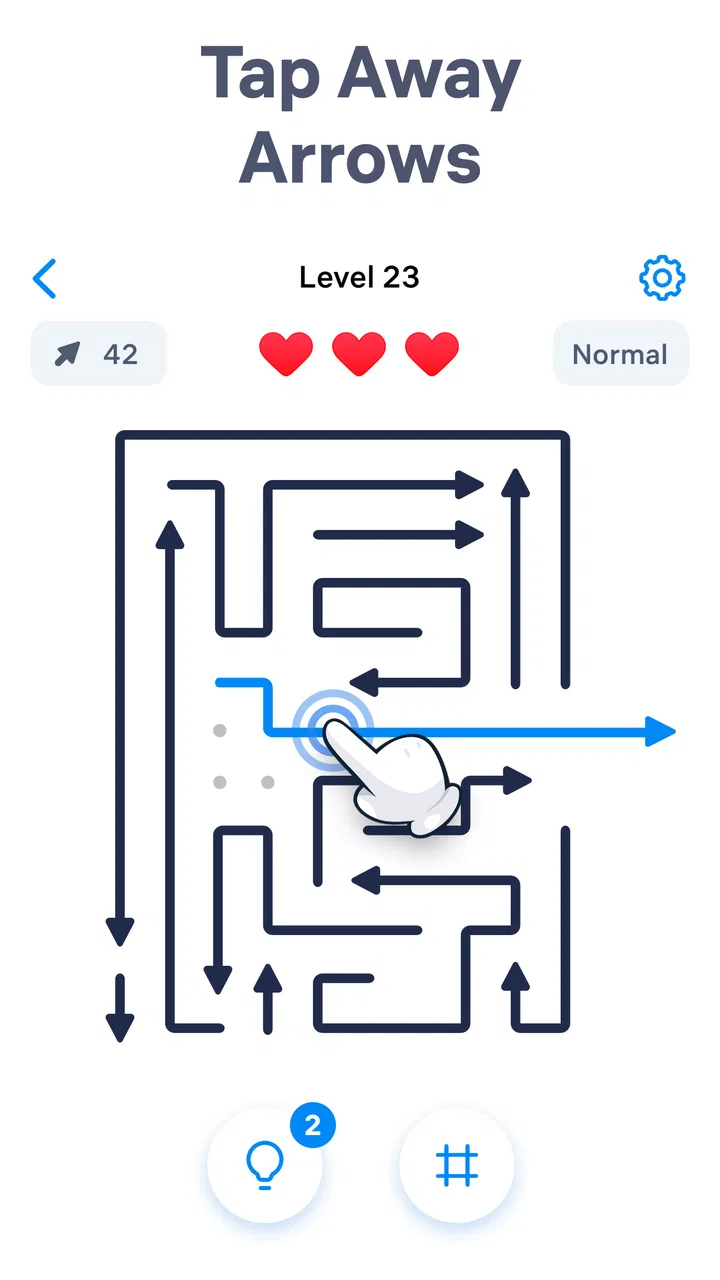
I went into Arrow Puzzle expecting a quick tap-and-clear game, but its appeal is more deliberate than that. The basic idea is easy to understand: arrows sit inside compact arrangements, and I tap them to remove them in the correct direction. The challenge comes from the way each move depends on the space around it. An arrow that looks ready may still be blocked, while another move can open a route that was not visible at first.
That simple relationship between direction, obstruction, and timing gives the game a pleasant mental rhythm. I am not managing a complicated inventory or learning a long rulebook. I am reading a visual problem, making a choice, and watching the layout change. When the choice is right, the puzzle feels clean. When it is wrong, the mistake usually feels understandable rather than random.
As a free puzzle game from Easybrain, it is clearly aimed at short sessions as much as extended play. The game has a Teen content rating, runs on Android versions from 7.0 onward, and its current version is 1.4.0. Its broad reach is reflected in more than a million installs and an average rating of 4.8 from roughly ninety-nine thousand ratings. Those figures do not replace personal experience, but they do match my impression that this is designed to be approachable immediately.
You May Also Like

 AccuWeather: Weather Radar
AccuWeather Review: A Quick, Clear Forecast for Everyday Decisions
For everyday plans, the best forecast is the one you can understand quickly. AccuWeather makes rain timing, radar, and local conditions easy to act on, with a few trade-offs.

 Hill Climb Racing
Why Hill Climb Racing Still Turns Crashes Into One More Run
A tiny car, a bumpy hill and one more upgrade: Hill Climb Racing keeps resurfacing because its simple chaos makes every near-miss feel personal.

 AliExpress - Shopping App
AliExpress Makes Global Shopping Feel Personal, but Shoppers Bear the Risk
AliExpress turns a global marketplace into a pocket-sized discovery engine. Its reach is useful, its shopping loop compelling, and its trade-offs easy to miss.

 Lords Mobile: Kingdom Wars
Lords Mobile Is a Kingdom-Building Routine, Not a Quick Match
A case-by-case verdict on the building, battles, device demands, and social commitments that make Lords Mobile rewarding for some players and exhausting for others.

 PDF Scanner app - TapScanner
TapScanner Makes Paperwork Easier to Capture, Check, and Share
TapScanner makes scanning with a phone feel less like a rescue operation and more like a dependable step in getting work done. Its capture tools are useful, though not flawless.

 Block Blast!
 Shows How Much a Puzzle Game Can Leave Out
A quiet grid game shows why puzzle players increasingly value instant clarity, repeatable skill and low-pressure play—and where the genre still needs to catch up.
More From Our News Desk
View All News


How the first few puzzles establish the mood
The first thing I noticed was how strongly the visual arrangement carries the experience. There is no need for a story-heavy setting to explain what I should care about. The board itself becomes the setting: a contained space full of directional objects, small barriers, and potential routes. The art direction keeps attention on the puzzle rather than decorating it with unrelated detail.
That restraint matters. In many mobile puzzle games, bright effects and constant movement can make a simple mechanic feel louder than it needs to be. Here, the arrow shapes are the important language. Their points tell me what each piece wants to do, while their placement tells me whether that action is currently possible. The result is a visual style that feels functional without being dull.
I also like the way the game encourages me to inspect the whole arrangement before tapping. At first glance, it is tempting to remove the most obvious arrow. After a few mistakes, I started looking for the pieces that had the clearest path and the ones that were likely to unlock several others. That small change in attention is where the puzzle becomes more satisfying than a basic matching game.
One useful habit is to treat the board as a sequence of openings rather than a collection of individual arrows. I look for a move that clears a lane, then check which newly exposed arrows become available. This approach is more reliable than tapping according to color, position, or visual prominence. It is also a good reason to slow down, because the fastest-looking move is not always the best first move.
The presentation supports that slower inspection. The board is readable enough for me to distinguish the direction of an arrow without feeling that I need to memorize a complicated interface. That makes the game suitable for a short break when I want a puzzle that begins quickly, although players who prefer rich visual worlds may find the setting intentionally minimal.
A visual language built around direction
The strongest artistic decision is the commitment to arrows as both characters and instructions. They are not merely symbols placed on top of a puzzle; they define how I read the entire board. Every object points toward a possible exit, but the surrounding layout determines whether that promise can be fulfilled.
This creates a useful tension between what I see and what I can actually do. An arrow may point toward open space, yet another piece can still interfere with its route. Conversely, a crowded section may become simple once one carefully chosen arrow disappears. The visual design therefore communicates the rules without needing long explanations, and the board changes meaning as pieces are removed.
I found that this makes the game more visually thoughtful than its premise first suggests. The art is not trying to tell a dramatic story, but it does create a coherent playable mood: focused, tidy, and slightly suspenseful. The suspense comes from uncertainty about the next safe move, not from a narrative threat.
That distinction is important when deciding whether this game fits your taste. If you want a puzzle with characters, dialogue, or a strong fictional location, this will feel spare. If you enjoy clean layouts where every object has a mechanical purpose, the limited visual vocabulary works in its favor. I would describe the style as organized rather than expressive, with the board doing most of the artistic work.
For players who find busy screens tiring, that clarity is a practical benefit. I can return to a puzzle after looking away without having to reconstruct a complicated interface. The directional shapes remain the main reference point. On the other hand, players who rely heavily on color or decorative landmarks may need to pay closer attention to orientation and blocking, because those are the details that matter most.
Sound, taps, and the pace of a session
The game’s mood is also shaped by how each action is paced. Removing an arrow gives the board time to change before I make the next decision. That pause is valuable because it turns the interaction into a sequence of observations rather than a frantic chain of taps. I can see what opened, reassess the remaining structure, and continue.
I would not play this as a reflex game. Its best rhythm is closer to a visual breathing exercise: inspect, tap, watch the result, then inspect again. The sound design, where present during play, works best when it stays subordinate to that rhythm. What matters most is that the feedback makes a successful move feel definite without drowning out the thought process.
This pacing also makes the game useful in everyday situations. I can imagine opening it while waiting for an appointment, sitting on public transport, or taking a short pause between tasks. A puzzle can be approached for a few minutes without demanding the emotional commitment of a long campaign. The same quality makes it easy to stop when I need to do something else.
There is a trade-off, though. Players who want constant stimulation may interpret the measured tempo as slow. The game does not seem designed to reward reckless speed; it rewards recognizing the right order. I enjoyed that because the board remained the focus, but someone looking for rapid arcade pressure would probably be happier with a reflex-oriented alternative.
My practical advice is to avoid tapping while your attention is divided. The puzzles are approachable, but the important information is spatial. If I glance away repeatedly or play while rushing, I am more likely to miss a blocked route and blame the puzzle for a mistake I created myself. A quiet minute and a deliberate scan make a noticeable difference.
Why the mechanics and presentation belong together
The central mechanic succeeds because the art direction explains it instantly. Arrows point, obstructions interrupt, and cleared space reveals the next decision. Nothing about the visual presentation asks me to ignore the rules in favor of spectacle. That consistency gives the game a strong mechanical identity even though the interaction itself is simple.
I especially appreciate that the puzzle is not just about finding any legal move. The more interesting question is which legal move preserves the most options. If I remove an arrow that opens one route but closes my understanding of another, I may create a harder position for myself. If I clear a central obstruction first, several later choices can become obvious.
This is one of the game’s less obvious strengths: it quietly teaches forward planning without announcing itself as a strategy tutorial. I began by reacting to the arrow directly in front of me. With experience, I started checking the consequences two or three moves ahead. That is enough depth to make repeated sessions feel mentally active, even without a complex ruleset.
Another useful technique is to identify bottlenecks. Some areas of the board contain pieces that seem to control access to several others. I try to determine whether one of those pieces must move before the surrounding arrows can be solved. This prevents me from wasting time on isolated moves that do not improve the overall position.
When I do make a poor choice, the frustration is usually connected to the board’s logic. I can often trace the problem back to overlooking a blockage or assuming that an arrow had a clear route. That is healthier than losing because of an unexplained timer or a sudden difficulty spike. Still, it means the game demands visual concentration, and it may not be ideal for anyone looking for a completely passive time filler.
The game’s free entry point helps with experimentation. I can try the basic experience without committing money first. There are in-app purchases priced at $14.99 per item, so I would pay attention before confirming any optional purchase. For me, the sensible approach is to treat the free access as a chance to decide whether the puzzle loop genuinely fits my habits rather than assuming every extra option will improve it.
Where it fits among familiar puzzle alternatives
Compared with a match-three game, this feels less dependent on pattern recognition and more dependent on spatial order. I am not searching for identical pieces or building a chain of combinations. Each arrow has a directional purpose, and the surrounding arrangement determines when that purpose can be used. That makes the experience calmer and more analytical.
Compared with a traditional sliding-block puzzle, it is easier to begin because the arrow itself communicates the intended movement. I do not need to learn a special notation or understand a large set of possible transformations. The challenge is still about opening routes, but the interaction is more direct and tactile.
It also differs from word puzzles because the difficulty is visible rather than linguistic. Someone who does not enjoy vocabulary challenges may find this more welcoming, while a player who wants broad subject matter or changing categories will probably find the visual focus narrow. The game knows what it is trying to do, and that focus is both its strength and its limitation.
I would choose it over a heavily story-driven puzzle when I want immediate play and a clean mental task. I would choose a richer alternative when I want exploration, character progression, or a stronger sense of place. Arrow Puzzle does not compete by offering more systems; it competes by making one central idea easy to grasp and satisfying to repeat.
Who will enjoy it, and who should look elsewhere
This is a good fit for people who like compact logic challenges, visual planning, and games that can be paused mentally between moves. It should also suit players who enjoy improving their own solving process: scanning first, finding bottlenecks, and choosing moves that preserve future options.
I think it is particularly useful for short breaks because the interaction has a natural stopping point whenever I finish a small section or decide to put the board down. It does not require me to remember a complicated story state. Returning to the puzzle means returning to the arrows and their available routes.
I would be more cautious about recommending it to someone who wants a rich atmosphere built from narrative, music, and character development. The mood is coherent, but it is created through order, motion, and visual clarity rather than a detailed fictional world. Players who need constant novelty may also find the focused mechanic repetitive over long sessions.
The Teen rating is worth keeping in mind for families choosing games for younger players. It is not something I would casually present as a universal children’s title without checking whether its rating suits the intended player. For supported devices, the Android requirement begins at version 7.0, which makes it accessible to many older phones, though the experience will naturally depend on the individual device.
Easybrain’s involvement also sets a clear expectation: this is a polished, accessible mobile puzzle rather than an experimental niche title. That is helpful if you want something understandable within moments. It is less helpful if you are searching for unusual controls or a puzzle system that constantly reinvents itself.
Small habits that make the puzzles easier to read
My first recommendation is to pause before the opening move. I scan the outer edges, then the middle, and look for arrows whose paths appear unobstructed. This prevents the common mistake of choosing the most noticeable piece simply because it is visually prominent.
Second, I watch what a move changes rather than focusing only on what it removes. The important reward is often the newly exposed route. After every tap, I check which arrows gained space and whether a former bottleneck has disappeared. This turns each action into information, not just progress.
Third, I avoid treating a temporary dead end as proof that the puzzle is unfair. I retrace the last few decisions and ask when the available space began to shrink. Usually, the useful lesson is that I selected a move that was legal but strategically premature. That distinction helped me improve more than simply restarting without reflection.
Finally, I keep my session length sensible. Because the mechanic is quiet and repetitive by design, extended play can make my attention less reliable. Short sessions preserve the game’s best quality: the feeling of calmly solving a visual arrangement. If I start tapping automatically, I take that as a sign to stop rather than push through.
My atmosphere verdict
What stays with me is the consistency between the game’s appearance, sound-and-tap rhythm, and puzzle logic. The board looks like a problem, behaves like a problem, and gives me feedback that helps me understand the consequences of each choice. That unity is more valuable here than elaborate decoration would have been.
The best reason to try it is the clean connection between visual direction and thoughtful pacing. I can pick it up quickly, but solving well still asks me to look ahead. That balance gives the game enough depth for repeat visits without turning the first session into a lesson.
There are clear boundaries. It is not a substitute for a narrative adventure, a fast arcade challenge, or a puzzle collection with many unrelated formats. The focused arrow mechanic can feel narrow, and the optional purchase price of $14.99 per item is something I would consider carefully rather than treating it as an automatic upgrade.
Even with those limitations, I would recommend it to a friend who wants a free, visually clear puzzle for quiet breaks. The 4.8 average from about ninety-nine thousand ratings and its reach beyond a million installs suggest that many players have found the same accessible appeal, while my own reason for returning is more specific: I like the moment when a cluttered arrangement suddenly reveals its correct order.
If that kind of small, satisfying breakthrough sounds better than constant action, this game is worth trying. Start slowly, study the routes, and let the board set the pace. Its atmosphere works because it never loses sight of the mechanic, and that is exactly why the simple presentation feels purposeful rather than empty.
FAQs for Arrow Puzzle: Tap Puzzle Games
01What is Arrow Puzzle - Tap Away Game and how does it work?
Arrow Puzzle - Tap Away Game is an engaging puzzle game where players tap arrows to clear the board. Each arrow points in a specific direction, and tapping it will send it flying off the screen, provided there's space. The goal is to strategically tap all arrows until none are left, requiring both planning and foresight.
02Is Arrow Puzzle - Tap Away Game free to play?
Yes, Arrow Puzzle - Tap Away Game is free to download and play. However, it may offer in-app purchases for additional features or to remove ads. These purchases are optional and designed to enhance the gaming experience, but they are not necessary to enjoy the core gameplay.
03What are the system requirements for Arrow Puzzle - Tap Away Game?
Arrow Puzzle - Tap Away Game requires a device running Android 5.0 or iOS 10.0 and above. Ensure your device has sufficient storage space for the app, which is about 100 MB. A stable internet connection is recommended for downloading updates and additional content.
04Does Arrow Puzzle - Tap Away Game have any in-app advertisements?
Yes, Arrow Puzzle - Tap Away Game includes in-app advertisements. These ads help keep the game free to play. Players can choose to watch ads for certain rewards or purchase an ad-free version if they prefer an uninterrupted experience.
05Can I play Arrow Puzzle - Tap Away Game offline?
Arrow Puzzle - Tap Away Game can be played offline, making it an excellent choice for entertainment without internet access. However, certain features, such as accessing leaderboard rankings or downloading new levels, may require an internet connection.
Pros
- Engaging and challenging puzzles.
- Intuitive and easy-to-learn controls.
- Visually appealing graphics.
- Regular updates with new levels.
- No intrusive ads during gameplay.
Cons
- Limited hints for difficult levels.
- In-app purchases can be pricey.
- Requires constant internet connection.
- Some levels feel repetitive.
- Soundtrack can become monotonous.

Arrow Puzzle: Tap Puzzle Games
Gallery